

Running a small business takes a lot of time. You have to manage customers, answer questions, follow up on leads, schedule appointments, update records, and keep daily work moving.
Some days, it can feel like there are not enough hours to finish everything.
The problem is not always that you have too much work. Sometimes, too much of your time goes into small, repeated tasks that need to be done every day.
For example, you may spend an hour replying to common questions, another hour following up with potential customers, and even more time updating your customer records. These tasks are important, but they can take you away from the work that helps your business grow.
This is where AI automation for small businesses can help.
AI automation combines artificial intelligence with software that can carry out certain tasks automatically. It can help your business respond to enquiries, organize information, manage routine communication, and connect different tools.
You do not need to automate everything at once. Even a few well-planned automations can make your daily work easier.
In this guide, we will explain how AI automation works, which tasks you can automate, how it can save time, and what to consider before using it in your business.
What Is AI Automation?
AI automation uses artificial intelligence and software workflows to handle tasks that would otherwise require manual work.
Traditional automation follows set rules. For example, if a customer fills out a contact form, the system sends an automatic confirmation email.
AI automation can handle more flexible tasks. Depending on the tools used, it may understand a customer’s message, identify what they need, summarize a conversation, or prepare a suitable response.
When AI and workflow automation work together, they can help manage a process from beginning to end.
For example, imagine a homeowner submits a form on your landscaping website.
A connected system could:
- Record the customer’s details.
- Send a confirmation message.
- Identify the type of service requested.
- Add the enquiry to your customer relationship management system.
- Notify the right team member.
- Create a follow-up task.
- Help the customer arrange an estimate.
Some steps may be handled by ordinary automation, while others may use AI. The exact process depends on your software and how it is configured.
The important point is that your team does not have to complete every step manually.
What Is the Difference Between AI and Automation?

Although people often use these terms together, they are not exactly the same.
Automation follows rules to complete tasks. For example, it can send an appointment reminder one day before a scheduled visit.
Artificial intelligence can help interpret information, understand language, summarize messages, and generate responses. Its results still need suitable instructions, reliable information, and checks where accuracy matters.
AI automation combines these abilities. AI can help understand a request, while automation moves the information to the right system and triggers the next action.
For a small business, this can mean less manual data entry, faster communication, and a more organized way to manage customer enquiries.
Why Do Small Business Owners Need AI Automation?
Small business owners often handle several roles at once. They may be responsible for sales, customer service, marketing, scheduling, and daily operations.
Hiring someone for every task may not be affordable or necessary. At the same time, doing everything manually can become difficult as the business grows.
AI automation can help by reducing repetitive work and making common processes more consistent.
Here are some common problems it can address.
1. Too Much Time Spent on Repetitive Tasks
Many business tasks follow the same pattern every day.
You receive an enquiry, send a reply, record the customer’s details, schedule a meeting, and follow up later. Doing this once may take only a few minutes. Repeating it dozens of times can take a large part of your day.
Automation can handle suitable steps in the background.
For example, when a new lead submits a form, the system can save the information, send a confirmation, and notify your team without someone entering the same details into several tools.
2. Slow Responses to Customers
Customers often expect businesses to respond within a reasonable time.
If your team is busy, a new enquiry may sit unanswered until later in the day. The customer may then contact another provider.
An automated acknowledgment can let the customer know their enquiry has been received. Depending on the system, an AI assistant may also answer common questions using information approved by your business.
More complex questions can be passed to a team member.
3. Disorganized Customer Information
Some businesses keep customer details in spreadsheets, emails, notebooks, and separate messaging apps.
This makes it harder to see who contacted the business, what they need, and whether someone has followed up.
A customer relationship management system, commonly called a CRM, helps organize customer details and communication in one place.
When connected to automation, it can create records, update contact information, and remind your team about tasks that still need attention.
4. Missed Follow-Up Opportunities
A potential customer may ask for a quote today but not be ready to buy until next week.
If nobody follows up, the opportunity may be forgotten.
An automated workflow can create a reminder or send an appropriate follow-up message according to your business rules. Your team can then review the customer’s response and decide what to do next.
Automation cannot guarantee a sale, but it can help reduce the number of enquiries that are overlooked.
7 Ways AI Automation Can Save Time for Small Businesses
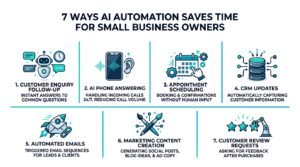
You do not need a complicated system to begin. The best starting point is usually a task that happens frequently, follows a clear process, and takes time away from more valuable work.
Here are seven practical examples.
1. Automate Customer Enquiries and Lead Follow-Up
When someone contacts your business, a few things usually need to happen. You need to acknowledge the enquiry, understand what the person wants, collect relevant information, and decide on the next step.
These tasks can become difficult when several enquiries arrive at the same time.
AI automation can help manage the first part of this process.
For example, a potential customer visits your website and submits a form asking for a driveway paving estimate.
A connected workflow could send a confirmation message, save the customer’s information in your CRM, and notify the sales team.
An AI assistant could also help organize the enquiry by identifying the service requested and summarizing the customer’s message.
If the customer needs more information, the system may ask a few approved questions before passing the enquiry to your team.
This reduces the need to copy information between systems and helps your team see what needs attention.
Who Can Benefit?
This type of automation can be useful for:
- Contractors who receive quote requests.
- Real estate agents who manage buyer and seller enquiries.
- Cleaning companies that receive booking requests.
- Marketing agencies that handle new leads.
- Consultants who arrange discovery calls.
The exact workflow should match the way your business handles new customers.
2. Use AI Voice Agents to Handle Routine Calls
Phone calls can interrupt your work throughout the day.
You might be meeting a customer, working on a project, driving between locations, or speaking with another caller. Every interruption makes it harder to focus.
An AI voice agent can help handle certain incoming calls based on your business information and rules.
Depending on its capabilities, it may be able to answer common questions, collect contact details, identify what the caller needs, and help arrange an appointment.
For example, a homeowner calls a landscaping company to ask whether it provides patio installation.
The AI voice agent can provide the approved service information and ask whether the customer would like to arrange an estimate.
If the caller asks something the system cannot answer reliably, it should offer an appropriate next step, such as arranging a callback or transferring the call when supported.
How Does This Save Time?
Your team may spend less time answering repeated questions and collecting basic information.
It can also help when calls arrive outside normal working hours, provided the system is configured to handle them.
However, AI voice agents are not suitable for every conversation. Sensitive situations, complaints, complex questions, and requests that require professional judgment may need a human response.
The goal is to support your team, not remove the need for personal service.
3. Automate Appointment Scheduling and Reminders
Scheduling appointments often involves several messages.
A customer asks about availability. Someone checks the calendar. The customer chooses a time. The business confirms the appointment. Later, someone may need to send a reminder.
Automation can reduce this back-and-forth.
For example, a customer submits a consultation request on your website. The system sends a booking link connected to your calendar. The customer chooses an available time, and the appointment is added to the calendar.
A reminder can then be sent before the meeting.
If the system supports rescheduling, customers may also be able to choose a new time without starting the entire process again.
Why Is This Useful?
It reduces manual scheduling work and makes it easier for customers to book appointments.
It may also help reduce missed appointments by reminding customers about upcoming meetings.
For businesses that offer estimates, consultations, service visits, or recurring appointments, this can be a useful place to start.
Before launching, make sure the calendar integration uses the correct availability and does not confirm appointments that are already booked.
4. Keep Your CRM Updated Automatically
A CRM helps a business keep track of customers, leads, conversations, and sales opportunities.
However, a CRM is only useful when the information inside it is accurate and up to date.
If employees have to enter every new contact, update every status, and record every conversation manually, the system can become another source of work.
Automation can help.
For example, when someone completes a contact form, the system can create a new contact record. When an appointment is booked, it can update the lead’s status. When a customer responds to a message, the conversation may be recorded against the contact.
AI can also help summarize long conversations or categorize enquiries when the integration supports those features.
What Does This Mean for a Small Business?
Your team can spend less time managing records and more time working with customers.
It also becomes easier to identify which enquiries need a callback, which estimates are still pending, and which customers are ready for the next step.
You should still check your CRM regularly. Automation can make mistakes, and duplicate records or incorrect information can create problems if nobody reviews them.
5. Automate Routine Emails and Customer Messages
Many businesses send similar messages every day.
These may include appointment confirmations, responses to common questions, reminders about required information, and updates about a service request.
Writing each message from scratch takes time.
AI can help prepare a response using information supplied by your business. Automation can then send approved messages when a specific event occurs.
For example, after a customer books a consultation, the system sends a confirmation with the date, time, and meeting details.
After a customer submits a quote request, it may send a message explaining what happens next.
AI can also help draft replies to common enquiries, but messages involving prices, contractual terms, complaints, or other important decisions should be reviewed when needed.
Keep Your Messages Natural
Automatic messages should sound like your business, not a machine.
Use clear language. Avoid unnecessary promotional wording. Make sure the information is accurate and that customers can reach a real person when they need help.
Also, follow the applicable rules for email and text messaging, including consent and opt-out requirements where relevant.
6. Simplify Marketing and Content Creation
Marketing takes time, especially when you need to publish regularly across several channels.
You may need to plan topics, write captions, prepare emails, create outlines, and turn one idea into several pieces of content.
AI tools can help with these tasks.
For example, you could provide information about a service and ask an AI tool to create a first draft of a blog outline, social media caption, or email newsletter.
Your team can then review the draft, add real business examples, correct any errors, and make sure the content reflects your brand.
AI can also help turn a detailed article into a shorter social media post or suggest different ways to explain the same idea.
What Should You Avoid?
Do not publish AI-generated content without checking it.
It may include incorrect information, generic advice, or claims that your business cannot support. Publishing large amounts of low-quality content can also hurt the user experience.
The best use of AI is to reduce the time spent on the first draft and repetitive editing, while people remain responsible for accuracy, quality, and the final message.
7. Automate Review Requests and Customer Feedback
Customer reviews can help people understand what it is like to work with your business.
However, remembering to request feedback after every completed job can be difficult.
A simple workflow can send a review request after a job is marked complete or after a service appointment has taken place.
For example, once a landscaping project is completed, your CRM can trigger a message asking the customer to share honest feedback about their experience.
If the customer replies with a problem, the workflow can notify your team so someone can address it.
This creates a more consistent process without requiring employees to remember every request manually.
Make sure review requests follow the rules of the platform you use. Do not offer rewards for positive reviews, filter out unhappy customers to manipulate ratings, or create fake reviews.
The purpose is to make it easier for real customers to share honest feedback.
How Much Time Can AI Automation Actually Save?

The amount of time saved depends on your business, the tasks you automate, how often those tasks occur, and how much manual work is removed.
There is no single number that applies to every small business.
A useful way to estimate the potential savings is to calculate the time currently spent on a task and compare it with the time required after automation.
For example, suppose your team spends 15 minutes manually processing each new enquiry and receives 20 enquiries per week.
That is five hours of work per week on this task alone.
If automation reduces the manual processing time to five minutes per enquiry, the task would require about one hour and 40 minutes per week.
Which Tasks Should You Automate First?
It is tempting to automate everything at once, especially when many tools are available. However, starting with too many workflows can make the project expensive and difficult to manage.
A better approach is to begin with one clear problem.
Look for tasks that:
- Happen frequently.
- Follow a repeatable process.
- Take time away from important work.
- Have clear rules and predictable outcomes.
- Can be measured before and after automation.
For example, if your team spends a lot of time entering website enquiries into a CRM, start there. If appointment reminders are often forgotten, automate those first.
Avoid beginning with a complex process that requires many exceptions or important decisions without human review.
Start With One Workflow
Choose one task and write down every step involved.
Identify what triggers the process, what information is needed, what the system should do, and when a person needs to step in.
Then build and test the workflow using real examples.
Once it works reliably, you can decide whether to automate another task.
This approach helps you learn what works without changing your entire business at once.
Is AI Automation Expensive for Small Businesses?
The cost varies widely.
Some businesses can begin with features already included in their existing software. Others may need a separate AI tool, a CRM subscription, integration work, or a custom setup.
The total cost may include:
- Monthly software subscriptions.
- AI usage or message charges.
- Phone number or communication fees.
- Initial setup and integration.
- Ongoing maintenance and testing.
- Staff training.
Before choosing a tool, calculate how much time the current process takes and how much the new system is expected to save.
Also consider the value of improved consistency, faster responses, and fewer forgotten tasks. These benefits can matter, but they should be measured rather than assumed.
You do not need the most advanced platform to get started. A simple workflow that works reliably can be more useful than a complex system that your team struggles to use.
Common Mistakes to Avoid When Using AI Automation
AI automation can save time, but only when it is planned and managed properly.
Automating a Broken Process
If your current process is confusing, automation may simply make the confusion happen faster.
First, understand how the task should work. Remove unnecessary steps and make responsibilities clear before automating it.
Expecting AI to Be Perfect
AI can misunderstand questions, produce incorrect answers, or fail to recognize unusual situations.
Give the system accurate information, set clear limits, and create a way to pass difficult cases to a person.
Using Too Many Tools
Adding several platforms can create more work if they do not connect properly.
Choose tools that work with your existing systems where possible. Make sure customer information moves to the right place and does not create duplicate records.
Ignoring Data Privacy
Business automation may process customer names, phone numbers, emails, and other private information.
Use reliable providers, restrict access to sensitive information, and understand how your data is stored and processed. Follow the privacy laws that apply to your business.
Do not send sensitive customer details to an AI tool unless its data handling and your business policies allow it.
Failing to Check Results
An automated workflow may stop working after a software update or a change to a form, calendar, or phone system.
Review the process regularly. Check that messages are being sent correctly, records are updated, and important requests reach the right person.
Automation should reduce manual work, not remove responsibility for the outcome.
How FutureForge AI Solutions Can Help
Every business has different challenges. Some struggle with missed calls, while others spend too much time following up on leads, organizing customer information, or managing appointments.
FutureForge AI Solutions helps businesses explore practical ways to automate repetitive work and improve their daily processes.
Depending on your needs, this may include:
AI Voice Agents: Help manage incoming calls, answer approved questions, collect customer information, and support appointment booking.
Workflow Automations: Connect business tools and automate steps such as lead notifications, follow-up reminders, and customer record updates.
ForgeIQ CRM: Help organize contacts, leads, conversations, and follow-up activities.
Omnichannel Chatbots: Help website visitors and customers find information and submit enquiries.
Website Development and SEO Optimization: Help businesses build a useful online presence and make it easier for potential customers to find their services.
The right solution depends on your current systems, budget, and goals. You may only need one automation to solve your main problem, or you may benefit from connecting several processes.
The first step is to identify where your team spends too much time on repetitive work. From there, you can decide what should be automated and what still needs a personal touch.
Frequently Asked Questions
What is AI automation for small businesses?
AI automation combines artificial intelligence with software workflows to handle certain tasks automatically. Examples include responding to common enquiries, organizing customer information, summarizing conversations, and supporting appointment scheduling.
How can AI automation save time?
It can reduce repetitive manual work such as entering customer details, sending routine messages, scheduling reminders, and organizing leads. The amount of time saved depends on the task and the quality of the setup.
Do small businesses need technical skills to use AI automation?
Not always. Many tools provide visual workflow builders and ready-made integrations. More advanced setups may require technical help, especially when connecting different systems or handling complex business rules.
Can AI automation replace employees?
AI automation can handle some repetitive tasks, but it does not replace the need for people to manage relationships, make important decisions, solve unusual problems, and provide personal service. For many small businesses, it is best used to support employees.
Is AI automation suitable for contractors?
Yes. Contractors can use it to manage enquiries, follow up on quote requests, send appointment reminders, organize customer records, and handle some routine calls. The most useful setup depends on the contractor’s services and workflow.
Is AI automation safe for customer data?
It can be used responsibly, but safety depends on the tools, configuration, access controls, and data handling practices. Businesses should review provider policies, limit unnecessary data collection, and follow applicable privacy laws.
How do I know whether automation is working?
Measure the time spent on a task before and after automation. You can also track response times, completed follow-ups, appointment bookings, errors, and staff feedback.
What is the easiest task to automate first?
A good starting point is a frequent task with clear rules, such as sending appointment reminders, recording website enquiries in a CRM, or notifying your team when a new lead arrives.
Final Thoughts
Small business owners do not need to spend every day handling the same repetitive tasks manually.
AI automation can help manage routine communication, organize customer information, support appointment scheduling, and connect different business tools. This gives your team more time to focus on customers, service quality, and the work that matters most.
You do not need to automate everything at once. Start with one task that takes too much time, build a reliable process, and measure the results.
The goal is not to use AI for everything. It is to use the right tools where they make your work easier.
Ready to find out where automation could save your business time?
Visit FutureForge AI Solutions to explore practical AI and automation solutions for your business.


